Repair goes mega mainstream with the launch of Lenovo’s new T-series business laptops, which earned our highest honor with a 10/10 repairability score.
And yet still not as serviceable/durable as older ThinkPads. They don’t even have water spouts in the keyboard/chassis like the older ones. One could dump a beverage on the keyboard on the older models and it would route through the keyboard->chassis->even the docks had water routing ports so it would just keep traveling mostly harmless through to underneath.
Nor batteries externally removable like used to be.
Not a bad step though by any means, and great to see this return to user-serviceability.
Props though, on the removable RAM. Given the need for shorter circuit paths for higher performance RAM these days, that looks a bit of clever engineering.
And yet still not as serviceable/durable as older ThinkPads.
Uh, have you ever replaced the motherboard on older ThinkPads? You have to tear the entire machine apart and it’s a 30+ minute job. Around the time they removed the water spouts they switched to the bottom opening instead of top opening and replacing the main board went down to a 10 minute job. Even just replacing the thermal paste on some older machines required full disassembly.
They may not have water spouts that let you pour a gallon of water through the keyboard, but they do have plenty of plastic shields that prevent water from going further into the computer. If you knock over your soda your computer will probably be fine.
Nor batteries externally removable like used to be.
This would be a major sacrifice to form factor and would be strictly detrimental to 99.999% of users. Regarding benefits outside repairability, basically nobody in 2026 is going to think to carry around a second, fully-charged laptop battery. Regarding repairability, you might have to replace the battery once during the laptop’s lifespan, and the procedure is extremely straightforward.
With an external battery, you end up with a laptop that’s not only substantially thicker, but which – because it’s stuck with a large battery either on the back or on the bottom – likely has worse airflow.
Notably for this repair, there are seven captive Phillips-head screws (seen plenty of hexalobular etc.), you can just use your fingers to remove the base cover (seen plenty where you need/want a pry tool), removing the base cover already removes the battery’s screw(s), and most importantly, you just pinch to disconnect instead of lifting a fragile connector off the board. Swapping the replacement external battery once you have it is probably about 30 seconds; this is about five minutes – practically no difference accounting for how infrequently it’ll need to be done. There’s an exception for people with a physical disability like Parkinson’s, but if you can phone a friend, the process is straightforward enough for basically anyone else to do it on your behalf.
You have to first undo five captive hexalobular screws on the bottom.
Then you have to lift the magnetic top panel, being sure not to damage the ribbon cable while you disconnect it.
You have to pull out the connector for the battery using a small, black flap.
Then you unscrew three more captive hexalobular screws.
As far as I can tell, the T14 is the easiest battery replacement you’re going to find being sold today. If you’re able-bodied enough to use a screwdriver and it not being external is somehow still a serious concern for repairability, I don’t know what to tell you.


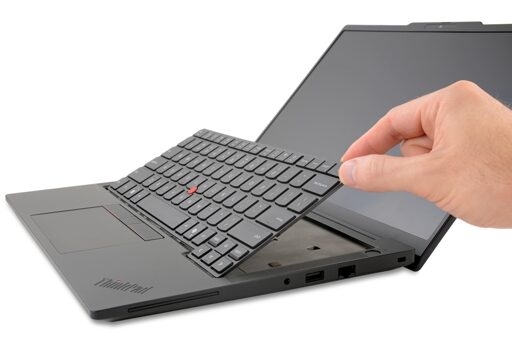
And yet still not as serviceable/durable as older ThinkPads. They don’t even have water spouts in the keyboard/chassis like the older ones. One could dump a beverage on the keyboard on the older models and it would route through the keyboard->chassis->even the docks had water routing ports so it would just keep traveling mostly harmless through to underneath.
Nor batteries externally removable like used to be.
Not a bad step though by any means, and great to see this return to user-serviceability.
Props though, on the removable RAM. Given the need for shorter circuit paths for higher performance RAM these days, that looks a bit of clever engineering.
…hhhhhwat
Uh, have you ever replaced the motherboard on older ThinkPads? You have to tear the entire machine apart and it’s a 30+ minute job. Around the time they removed the water spouts they switched to the bottom opening instead of top opening and replacing the main board went down to a 10 minute job. Even just replacing the thermal paste on some older machines required full disassembly.
They may not have water spouts that let you pour a gallon of water through the keyboard, but they do have plenty of plastic shields that prevent water from going further into the computer. If you knock over your soda your computer will probably be fine.
This would be a major sacrifice to form factor and would be strictly detrimental to 99.999% of users. Regarding benefits outside repairability, basically nobody in 2026 is going to think to carry around a second, fully-charged laptop battery. Regarding repairability, you might have to replace the battery once during the laptop’s lifespan, and the procedure is extremely straightforward.
With an external battery, you end up with a laptop that’s not only substantially thicker, but which – because it’s stuck with a large battery either on the back or on the bottom – likely has worse airflow.
Notably for this repair, there are seven captive Phillips-head screws (seen plenty of hexalobular etc.), you can just use your fingers to remove the base cover (seen plenty where you need/want a pry tool), removing the base cover already removes the battery’s screw(s), and most importantly, you just pinch to disconnect instead of lifting a fragile connector off the board. Swapping the replacement external battery once you have it is probably about 30 seconds; this is about five minutes – practically no difference accounting for how infrequently it’ll need to be done. There’s an exception for people with a physical disability like Parkinson’s, but if you can phone a friend, the process is straightforward enough for basically anyone else to do it on your behalf.
Edit: On a whim, I decided to look to Framework for a comparison. It’s worse there for battery replacement.
As far as I can tell, the T14 is the easiest battery replacement you’re going to find being sold today. If you’re able-bodied enough to use a screwdriver and it not being external is somehow still a serious concern for repairability, I don’t know what to tell you.